
I've posted three examples of Twitter hashtags datasets in the last week: one on China, one on Iran, and one on Algeria. In order to build these datasets, I needed to obtain older tweets; this is slightly more difficult than simply filtering the streaming feed for your hashtag of choice. The original code I wrote for this task is in Python and is well-parallelized, but the code isn't commented and looks more complicated than it is due to parallelization choices.
As part of my recent exercise to replace Python with R for entire tasks, I decided to rewrite this code using R. The code is pretty simple, well-commented, and consists of two functions — loadTag and downloadTag.
There is one significant issue with the code: at the moment, neither rjson nor RJSONIO seem to support Unicode data in JSON responses. Furthermore, when character vectors of unknown encoding are written to file with a function like write.table, they produce output that cannot be reliably read back into R. As a result, the code does not retain the text of a tweet — only the id, date, and username.
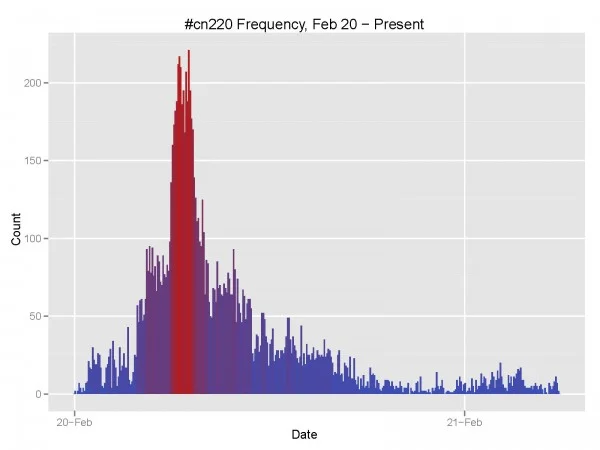
Once you've downloaded some data, producing frequency figures is only two lines away with ggplot2: load the tweets with loadTag, then plot with geom_bar using 5-minute binwidths.
#@author Michael J Bommarito
#@contact michael.bommarito@gmail.com
#@date Feb 20, 2011
#@ip Simplified BSD, (C) 2011.
# This is a simple example of an R script that will retrieve
# public tweets from a given hashtag.

library(RJSONIO)

# This function loads stored tag data to determine the current max_id.
loadTag <- function(tag) {
	# Set the filename
	fileName <- sprintf("tweet_%s.csv", tag)
	tweets <- read.table(file=fileName, sep="\t", header=TRUE, comment.char="", stringsAsFactors=FALSE)
	return (tweets)
}

# This function downloads
downloadTag <- function(tag) {
	# Set the filename
	fileName <- sprintf("tweet_%s.csv", tag)

	# Check to see if the file exists. If it does, load it.
	if (file.exists(fileName)) {
		tweets <- loadTag(tag)
		maxID <- min(tweets$id)
	} else {
		tweets <- NULL
		maxID <- 0
	}

	# Record the nextPage query when provided.
	nextPage <- NULL

	# Loop until we receive 0 results
	while (1) {
		if (!is.null(nextPage)) {
			queryURL <- sprintf("http://search.twitter.com/search.json%s", nextPage)
		} else {
			if (maxID != 0) {
				queryURL <- sprintf("http://search.twitter.com/search.json?q=%%23%s&rpp=100&max_id=%s", tag, maxID)
			} else {
				queryURL <- sprintf("http://search.twitter.com/search.json?q=%%23%s&rpp=100&", tag)
			}
		}

		# Execute the query
		response <- fromJSON(queryURL)
		newTweets <- response$results

		# Check to make sure that there are tweets left.
		if (length(newTweets) <= 1) {
			print(sprintf("No new tweets: %s %s", maxID, queryURL))
			break
		}

		# Now check for a nextPage query.
		if ("next_page" %in% names(response)) {
			nextPage <- response$next_page
		} else {
			nextPage <- NULL
		}


		# These lines do not include text because no JSON libraries support
		# Unicode at the moment.  Therefore, it is not safe to use R
		# and Twitter together on live data.

		# Write out the current tweets.
		dfTweets <- as.data.frame(t(sapply(newTweets, function(x) c(x$id, x$created_at, x$from_user))))
		names(dfTweets) <- c("id", "date", "user")
		dfTweets$id <- as.character(dfTweets$id)
		dfTweets$date <- as.POSIXct(strptime(dfTweets$date, "%a, %d %b %Y %H:%M:%S %z", tz = "GMT"))
		dfTweets$user <- as.character(dfTweets$user)

		# Append these tweets to the list.
		if (is.null(tweets)) {
			tweets <- dfTweets
		} else {
			tweets <- rbind(tweets, dfTweets)
		}

		# Now update our maxID variable.
		maxID <- min(tweets$id)

		# Store the current set of tweets.
		write.table(tweets, sep="\t", file=fileName, row.names=FALSE)

		# Output some debug info and sleep to be nice to Twitter.
		print(sprintf("%s, %s", maxID, dim(tweets)[1]))
		flush.console()
		Sys.sleep(10)
	}

	return (tweets)
}